
01 / NETWORK
Dedicated Audio Network
Connect your streamer, NAS or music server, and access point through your switch on a separate Audio LAN. Local playback can stay on that network, away from routine household broadcasts and discovery traffic.
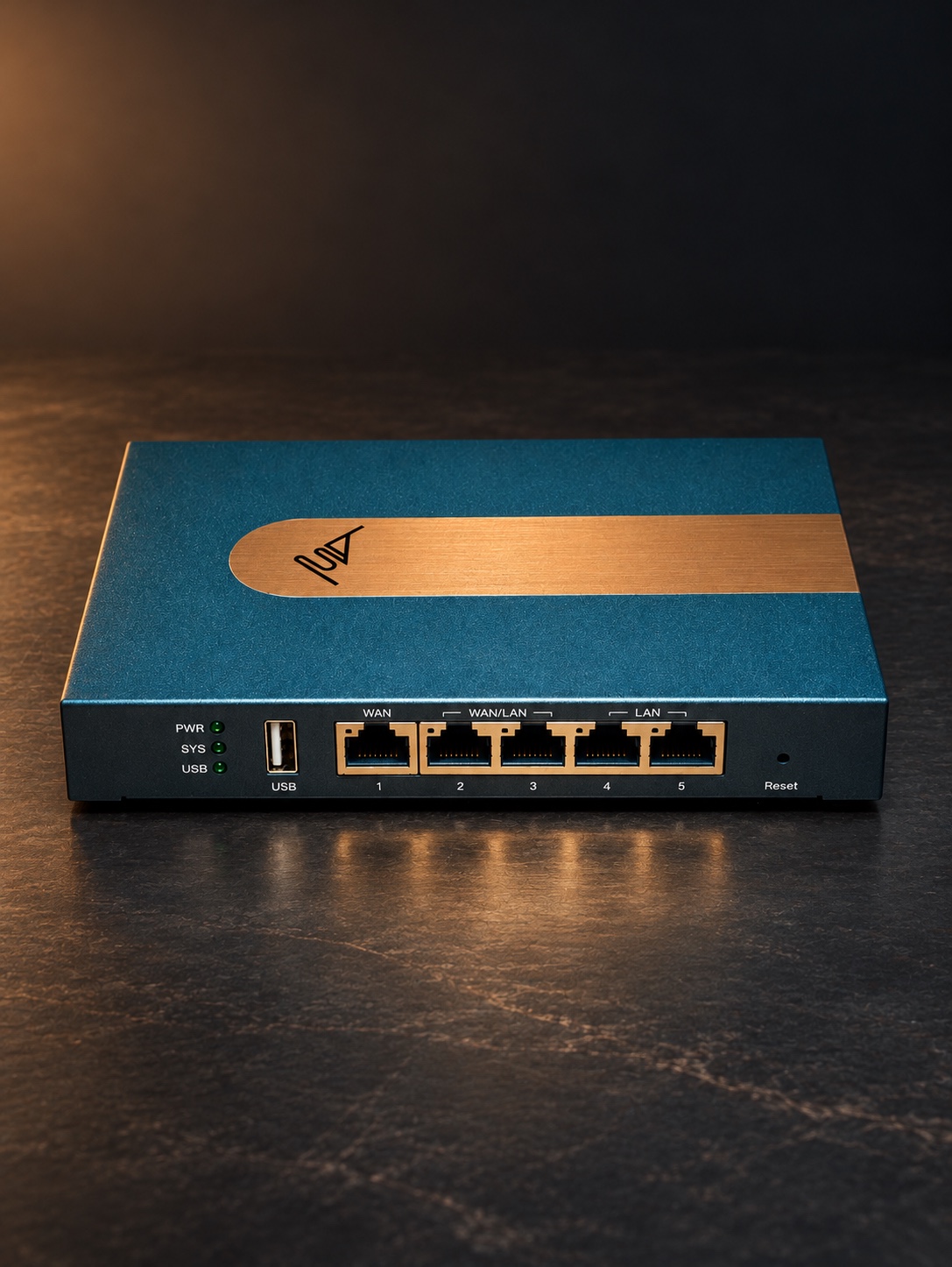
FUSE AUDIO / EDGE SERIES
A dedicated network for your hi-fi.
Keep your music server and streamer on their own wired network. Your home devices stay on the network they already use, while local music stays on the Audio LAN.
FUSE AUDIO DESIGN
A dedicated Audio LAN, a lean software profile and a front panel that goes dark after setup.
01 / NETWORK
Connect your streamer, NAS or music server, and access point through your switch on a separate Audio LAN. Local playback can stay on that network, away from routine household broadcasts and discovery traffic.
02 / OS & KERNEL
We tune the router’s firmware at both the operating system and kernel levels. Starting with a minimal system, we keep the services your audio network needs for IP address assignment, routing, firewall controls and router management. That leaves fewer background services running while you listen.
03 / PACKET PROCESSING
We refine how packets are received, processed and forwarded to reduce unnecessary work. The active Ethernet links use a 100 Mbps profile. A 24-bit/192 kHz stereo PCM stream carries about 9.2 Mbps of audio before network overhead.
Status lights when you need them. A dark front panel while you listen.
Reconnect a cable to restart its 90-second window once the link is restored. The network stays active when the lights go out.
HOW IT WORKS
While you play a track from your music server, a smart plug joins the home Wi-Fi and a phone looks for a printer. The plug and phone do their work on the Home Network. The track travels to your streamer on the Audio LAN.
HOME NETWORK
TVs, phones and smart-home devices use your existing router and Wi-Fi.
AUDIO LAN
Your Ethernet switch or audiophile switch connects your streamer, NAS or music server, and Wi-Fi access point on the Audio LAN. Join the access point’s Wi-Fi to control playback from your phone or tablet.
Online streaming still uses the internet connection shared by your home.
SYSTEM SETUP
Keep your home router in place. Add Edge Audio Router between it and the devices on your Audio LAN.
WITHOUT A SWITCH
Use LAN3 and LAN5 for up to two wired devices, one per port. Either port can connect a streamer, NAS or music server, or Wi-Fi access point.
Example · LAN3 → Streamer / LAN5 → Access Point
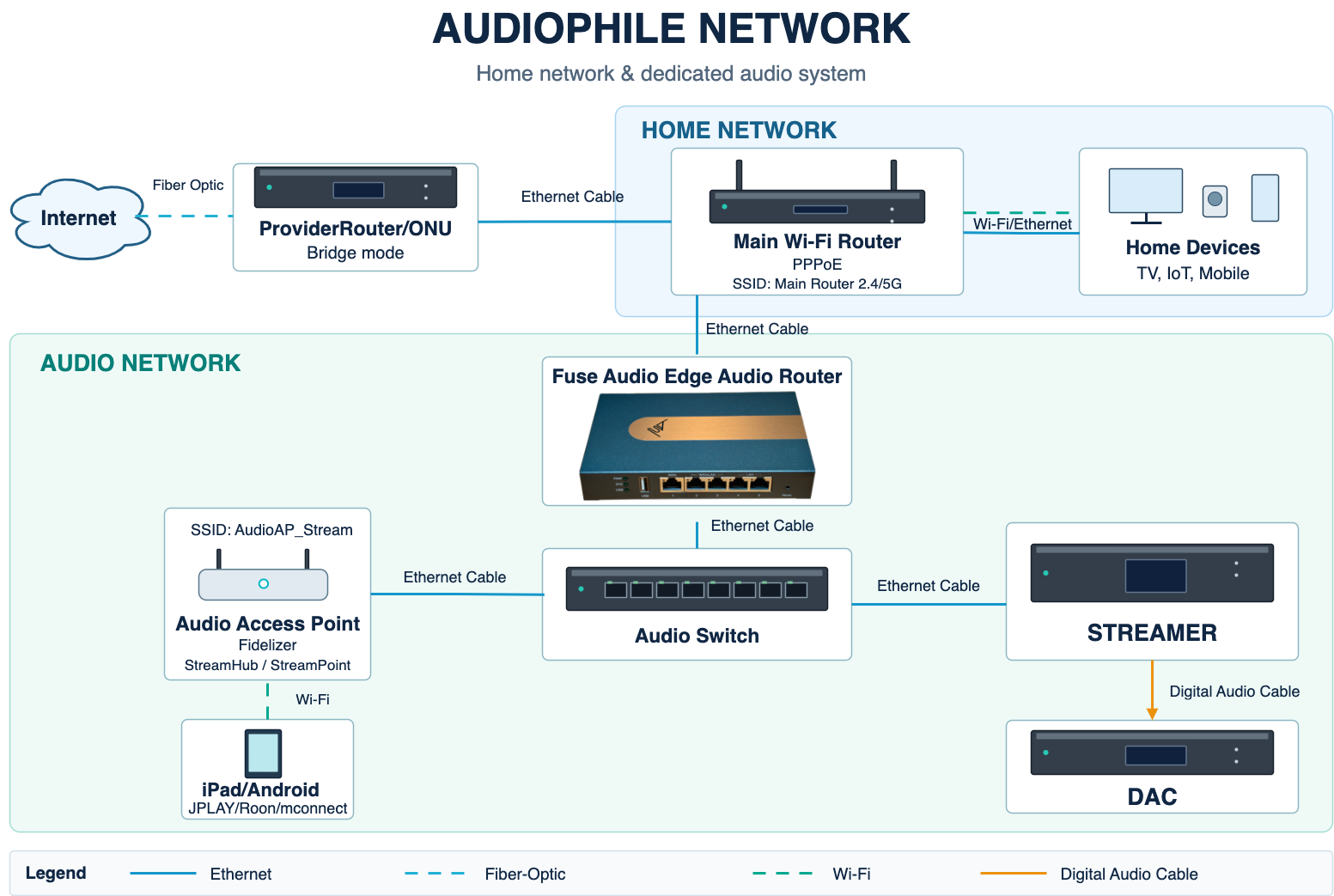
The Bridge Mode, PPPoE and access point model shown are examples. You can keep your existing home router and its internet settings.
BEFORE YOU BUY
Start with your existing home router and a streamer with an Ethernet port. The accessories you need depend on how many devices you connect and how you control playback.
INCLUDED
YOUR SETUP
HARDWARE SPECIFICATIONS
FAQ
It is a wired router for a dedicated Audio LAN. It connects to your existing home router so your music server and streamer can share a separate network for local playback.
For the setup shown, connect a LAN port on your existing router to WAN on Edge Audio Router. Your home router can keep its current internet settings.
We recommend using your Ethernet switch or audiophile switch to connect your streamer, NAS or music server, and Wi-Fi access point. Without a switch, connect up to two wired devices directly to LAN3 and LAN5. Either port supports any of these devices.
Connect your phone to the Wi-Fi access point attached to your audio switch. Without a switch, connect the access point directly to LAN3 or LAN5. Keep Roon Server, your player and Roon Remote on the same subnet. Roon network guide ↗
A single high-resolution stereo stream uses a fraction of the link capacity. Large file transfers, high-bitrate video and several streams at once can use more capacity when they share a router link.
Yes. Put your server or NAS and your streamer on the Audio LAN for local playback. The streamer can also reach the online services it already supports through your home internet connection.